Configure traffic routing and failover
Select compatible targets, balance new requests, drain a server or provide a ready backup under a single endpoint.
Inference → your endpoint → Traffic routing controls where new requests go without changing the endpoint URL your clients use. A target is a compatible serving destination for this model. Having two credentials for a server doesn’t give you two independent servers.
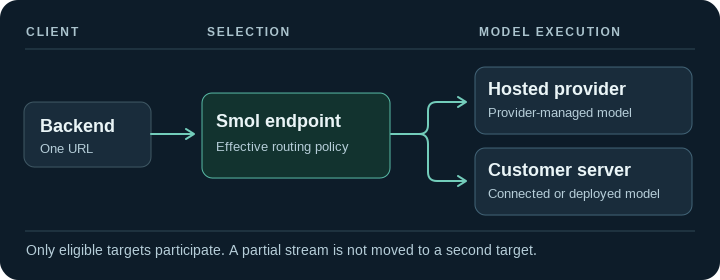
| Mode | Behavior | Good starting point |
|---|---|---|
| Single target | One target handles new requests | An endpoint with a single serving destination |
| Primary and backup | Prefer the primary and use an eligible backup when necessary | Keep a second compatible target ready without splitting normal traffic |
| Load balancing | Distribute new requests across eligible targets according to relative weight | Share work across multiple ready targets; a weight is not an exact allocation for every few requests |
Set up a backup or balance traffic
Section titled “Set up a backup or balance traffic”- Open Traffic routing. Check the current mode, target health, model and location. Choose a mode the endpoint offers.
- Use Add target or Add backup to choose an eligible destination for the same model. For weighted routing, set relative weights. For primary/backup, check the designated roles. Prefer independently hosted targets if you need resilience to a host or zone failure; two targets in the same failure domain can go down together.
- Optionally open Advanced limits and status. Set a concurrency limit per target and an overall request deadline. Maximum submission attempts is distinct from target selection: the second submission, when enabled, is permitted only with proof the earlier attempt did not execute. A timeout alone is not proof.
- Choose Review changes, inspect the proposed policy and confirm. Wait for Effective before expecting traffic to follow it. The desired revision is what you asked for; the effective revision is what is confirmed in service. If a save is unconfirmed, use Check status, not a second save.
- Inspect Activity and the selected request’s routing details. A successful check of target health doesn’t itself send a model generation or verify end-to-end latency.
If Deploy replica is available for your managed deployment, it starts a separate cost-bearing process with its own review. Wait for the replica to be eligible, then explicitly add it to the routing policy. Starting compute alone does not redirect requests.
Drain before maintenance
Section titled “Drain before maintenance”Mark a target as draining and confirm the policy. It stops accepting new assignments; work already admitted can finish. Check its active assignment count when available before taking it offline. Use Resume assignments and apply the policy when ready again. Disabling, draining or removing a target from routing does not stop or delete the machine.
For dropped streams, uncertain execution or an unhealthy target, see routing and streaming failures.